Introduction
Note: Since this project was posted it has been brought to our attention that RTL2832U / R820T sticks may not be fully supported in the RTL drivers used here. The RTL2832U / E4000 sticks work fine.
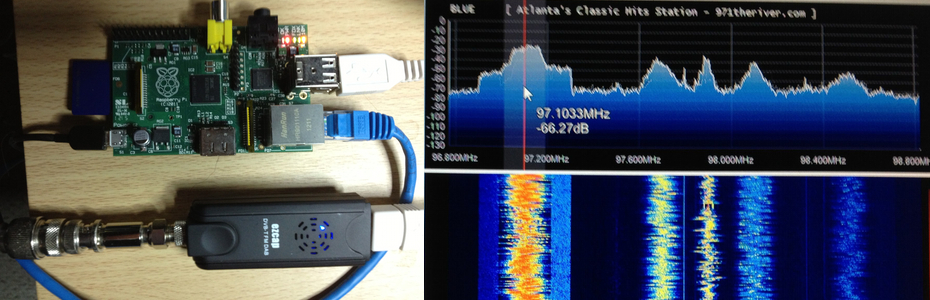
One of the often overlooked features of the RTL drivers for the RTL2832U SDR sticks is the TCP server. The TCP server allows you to send data from the RTL2832U stick across your home network to a remote PC running a program to process the data back into SDR information such as SDR Sharp. While the Raspberry Pi is not quite powerful enough to run current programs to decode and process the SDR data from the RTL2832U stick, it can do a very good job of running the rtl_tcp server. This means that you can plug the RTL2832U stick directly into the Raspberry Pi and wind up with a very small and portable SDR radio server. You can either plug the Raspberry Pi directly to your router or use Wifi for more flexibility in placement. If you decide to go the wifi route, I would suggest you use wireless N since bandwidth can be an issue. You can use either a WiFi dongle on the Raspberry Pi’s USB port or a WiFi gateway interface. The nice thing about the WiFi gateway is that it needs no drivers to connect to the Raspberry Pi since it converts WiFi date to ethernet. If you decide to go the dongle route, be sure to do a little research on what dongles work well on the Pi.
Demonstration Video
Why would you want to do this?
There are several reasons you might want to do this. Here are a few:
1. One of the biggest reasons would be to cut down on the amount of antenna cable you have to use. The less cable you use the less signal loss you will have. The Raspberry Pi and rtl_tcp combination will let you mount the RTL2832U closer to your antenna connection point. Let’s say for example that your antenna is mounted in the attic, but your monitoring station is downstairs. Rather than run 150 feet of cable to the monitoring station, mount the RTL2832U and the Raspberry Pi close to the antenna and use WiFi to send the SDR data downstairs.
2. Set up the Raspberry Pi / RTL2832U SDR server in one location and use your laptop running SDR Sharp to monitor your RTL-2832U SDR radio anywhere in the house.
3. Make the Raspberry Pi / RTL2832U server accessible from outside of your home network and listen to your SDR radio while you travel.
4. Set up a remote monitoring location in another part of the country.
5. Mount the whole thing in a weatherproof enclosure powered by solar cells and put it at the top of your antenna tower.
6. Tie it all to a helium balloon and have a 500ft antenna.
I am sure you could think of other uses for such a small portable SDR server.
Geting it Going
1. Install the latest Debian release on your Pi and update it.
2. Before you install the RTL drivers, you will have to install the following dependencies if they are not already installed by typing the following commands in terminal window at the prompt.
sudo apt-get install git
sudo apt-get install cmake
sudo apt-get install libusb-1.0-0.dev
sudo apt-get install build-essential
3. Now we are ready to install the RTL drivers using the following commands:
git clone git://git.osmocom.org/rtl-sdr.git
cd rtl-sdr/
mkdir build
cd build
cmake ../
make
sudo make install
sudo ldconfig
4. Before this will work you will need to locate your RTL directory using the file manger where the drivers where downloaded and copy the rules file into the etc/udev/rules.d directory.
5. Plug in the RTL-2832U stick and issue the rtl_test -t command to make sure the Raspberry Pi sees your stick.
6. Be sure that port 1234 is open on your router
7. To start the rtl server type rtl_tcp -a plus the ip address of your Pi. For example rtl_tcp -a 10.0.1.50
8. On your PC download the latest Dev version and configure it according to these instructions. Go to the interface section and and select RTL TCP and enter the IP address of your Raspberry Pi. Start SDR Sharp processing and it should be getting the data form the Pi and the RTL2832U.
9. You can now remove unnecessary peripherals like keyboard, monitor, and mouse.
Potential Problems
I have noticed that the server will stop working under the following circumstances, there may be more but these have been fairly consistent.
- If you exit SDR Sharp without stopping it’s processing of the remote data from the server.
- If the bandwidth gets to narrow to handle the data properly. This can be more of a problem with WiFi as the distance gets further between the Raspberry Pi and the router. A work around is to lower the sample rate on SDR Sharp.
- Tuning to an unsupported frequency area of your RTL-2832U stick.
For these reasons, if you are going to run the SDR server headless or locate the Raspberry Pi in an area where it cannot be accessed easily, you will need to get SSH going on the Pi and install Putty on your PC. By default SSH is usually already active on the Pi. Just install Putty on your PC and open a session using the IP address of your Pi. The default user name is usually Pi and the password is Raspberry. This will allow you to access the Raspberry Pi remotely to start the SDR server.

Hi thanks for you work writing this up. I went through the installation steps using the Debian Wheezy build after upgrading but I have a problem. rtl_test detects the device then reports it cannot be opened. In my distro I did not have a “etc/dev/rules.d” folder so created it and copied the rules file into it, do I need to chmod the rights on the folder of file, I did sudo su before creating the folder?
Sorry my bad, that should have read etc/udev/rules.d
Yep, that sorted my problem. Now have my Rpi serving out over my home network, albeit with the ‘problems’ you mentioned in the article. Thanks again.
Richard
cmake ../ -DDETACH_KERNEL_DRIVER=ON -DINSTALL_UDEV_RULES=ON
im new to this . but you mention the cmd cmake../
my pii say command not find.
can you please help me
thank you
bob fitzpatrick
Hi,
Thank You for the very easy and straight forward instructions! It worked right away! tested only with wired ethernet and no lockups!
/Risto
Works great on my 256mb PI and allows a full bandwidth transfer of the usb stick to sdr#.
Can you tell us what kind of usb stick you use? Especialy if it use E4000 or R820T on tuner… I am about to buy one and i’m not sure which one would be better (offcourse, to work with my 256M RaspberryPi). Thanks!
I used the E4000 chipset. There appears to be some issues right now getting the R820T working on the Pi.
Hi! I am trying this using an R820T tuner. Using the rtl_test, rpi successfully recognizes the device as well as the tuner, however it gives out this error:
rtlsdr_demod_write_reg failed with -1
rtlsdr_demod_read_reg failed with -1
rtlsdr_demod_write_reg failed with -1.
Any insights on this? Help would be very much appreciated, thanks!
In my case it was a power issue. Use powered USB hub or twin USB cable and separate USB power
Hello, and thanks for tutorial…
I manage to runmy Raspi and 2832/E4000 but trying the RTL 2832 / R820t i get the message:
pi@raspberrypi ~ $ rtl_tcp -a 192.168.178.60 -p 1234
Found 1 device(s).
usb_open error -3
Failed to open rtlsdr device #0.
Any idea ???
Tnx in advance and keep the nice work.
SV5BYR Mike
Rhodes island Greece.
There is an issue with the RTL820T working correctly. Even though the R820T driver looks to be available, it looks like that the R820T is missing from the provided Rules file. That will cause the stick not to be found. Maybe, someone will come up with the proper rule entry for the R820T
I found the solution to the problem. The issue is not with the Rules file. The issue is power. A standard 5V-1A power source seem to be insufficient to power up rpi as well as the dongle. To solve this, I used an external powered usb hub. This solved the problem! Hope this solves yours too!
Hi, I did run into the same error messages on my Pi and my solution was to “wirebridge” the SMD fuses on the board at the output USB ports. At a current of 200 mAmps they have a drop of about 300 mV which makes the power voltage to low for the dongles.
Thanks for the info Roman, I will have to give that a try!
Re e4000 and R820
I would say that there is a problem with the driver(s), I have tried using a 2 different powered hubs (3amp PSUs) for 820 and the dongle still is not fully recognised, it recognises the RTL chip and then says E400 not found, (does the sam even when not using powered hub) plus at one time using a hub I received the rtlsdr_demod_write_reg failed with -1
message for the E4000.
Using the dongles in PCs (various) no problem. On the PI I have bridged out the USB and power current limiting resistors so that full current can be applied (this has now been done on the new PI boards at manufacture)
It would be nice to get the 820 running as that is more sensitive than the E4000 chip
Yes, the rtl_test says that e4000 tuner is not found, however, you could now run rtl_fm and rtl_tcp successfully after using an external powered hub. or at least that is happening in my case.
You state that the “Raspberry Pi is not quite powerful enough to run current programs to decode and process the SDR data from the RTL2832U stick”. What are the limitations that you are seeing that would need to be improved on (memory, processor speed, etc)?
All the ones you listed, but mainly CPU resources with the current SDR software available. I suspect someone might come up with a light weight SDR program for it eventually. The Pi will run some SDR type programs now with some tweaking, but usually only for a dedicated application like ADS-B.
With the new Pi2 model B, it may run the software. Its a quad core ARM V7 with 1g of ram. Released it yesterday, and it is still only $35.00
With the new Pi2 model B, it may run the software. It’s a quad core ARM V7 with 1g of RAM. Released it yesterday.
Hi, Works great with ezCap.
How do I start rtl_tcp as a service, this so it autostart and I don’t need to have my terminal window open all the time..?
Thanks!
Hello Ken, your post is old and hope you resolved to start rtl_tcp as a service but i will still reply to your post maybe others will have the same issue and find some help on this.
I have just insert a line in /etc/rc.local and rtl_tcp will autostart on every reboot without need to keep terminal window open.
1. CTRL+ALT+T – this will open terminal window
2. sudo nano /etc/rc.local – with this you will edit that file
3. insert your password if any is use
4. above “exit 0” insert this line: sudo rtl_tcp -a YOUR local IP where RTL2832u is running
5. CTRL+X
6. Y – to save that file
7. ENTER – to accept changes
Reboot and thats it. Every time you reboot rtl_tcp will run all the time.
Hope this info will help someone out there!
73’s
Works perfect!
Found 1 device(s).
Found Rafael Micro R820T tuner
Using ezcap USB 2.0 DVB-T/DAB/FM dongle
Tuned to 100000000 Hz.
listening…
Use the device argument ‘rtl_tcp=192.168.1.101:1234’ in OsmoSDR (gr-osmosdr) source
to receive samples in GRC and control rtl_tcp parameters (frequency, gain, …).
Hello
I have problems with step 4. Maybe you can explain how I can get the rules into rules.d.
Hi Chris,
As step 4 says, you pretty much have to locate where you installed the original RTL driver folder on your Pi. In that folder should be a file labeled rules. You need to copy and paste that file into the etc/udev/rules.d directory on your Pi. It should work fine if your are using the recommended Wheezy version of Linux for your Pi.
Hi all, Im new to sdr and would like to have a go @ HF sdr using rasperry pi as server.Can anyone please tell me if R820t is supported by RPI os or am i best to go e4000/fcxxxx etc ? So many sticks !
The E4000 works better with the Pi.
Very good tutorial. I have a RTL2832U/FC0013, Conceptronic C08-096(CTVDIGUSB2) and it works perfect with my Raspberry Pi. Thanks!
I finally got mine up and running. Works fine at home on the local network, but when I try to access from a location outside the home network, the audio is very choppy. Away from home, I’m using Putty to start the Pi. I enter rtl_tcp -a 192.168.x.xxx and it starts fine.
I then go to SDR# and input my external ip addy in along with the port number, which has been forwarded and I get the choppy audio. This is with the sample rate in SDR# set all the way down to 0.25 MSPS.
I tried different sample rates in rtl_tcp and not much change.
Any ideas?
Thanks!
You can start rtl sdr with the & on the end on the command:
sudo rtl_tcp -a 192.168.1.101 &
When you shutdown your ssh de server keeps running, so you don’t use bandwith of for ssh.
Gr. Arie
Many thanks for the tutorial, but I have had no luck in getting the cmake ../ command to work. I am new to Linux and would appreciate any help.
On entering cmake ../ I get the following response
— Build tpe not specified: defaulting to release.
— Udev rules not being installed, install them with -DINSTALL_UDEV_RULES=ON
etc.
I copied the rules as specified into the rules.d directory.
Thanks – Mike
If used remotely by lets say an internet connection, how high should the upload speed be to have a good stream ?
has anyone tried this ?
Have you got a answer to your question?
Best regards
M
How can I make rtl_tcp run automatically at boot?
I have just insert a line in /etc/rc.local and rtl_tcp will autostart on every reboot without need to keep terminal window open.
1. CTRL+ALT+T – this will open terminal window
2. sudo nano /etc/rc.local – with this you will edit that file
3. insert your password if any is use
4. above “exit 0″ insert this line: sudo rtl_tcp -a YOUR LOCAL IP where RTL2832u is running
5. CTRL+X
6. Y – to save that file
7. ENTER – to accept changes
Reboot and thats it. Every time you reboot rtl_tcp will run all the time.
73’s
I know this is an old post, but hoping someone can help. Inserting that line does not work for me at this point. I’m a noob too. Tried a few different options I think and nothing.
Hi,
i just tried to setup the sdr server. But i got the message “Failed to open rtlsdr device #0”. The power supplys maximum current is 3A, so this should be enough. The Noxon DAB stick is pulged into the powered USB hub.
Any ideas?
Thanks.
Great article! I have been using the tuner stick directly connected to my laptop but I will have a go at using the SDR tuning system connected to my Raspberry Pi and connecting it to my home network. Is it also possible to use the USB dongle as a DAB tuner so you can have a network based DAB radio?
Hi,
I using two DVB-T devices and this running.
Device #0 on port 1234 and device #1 on port 1235.
In SDRsharp can i change the dongle with port change.
If i open SDRsharp twice it running to, but i stopping one crashes service on the Raspberry Pi.
The kill command takes no effect i must restart the Raspberry.
I want plug more DVB-T devices in future.
Have any idea for simultan use, if do not crash the service?
I used my old 12w iPad 2 power adapter for my RPi, a NooElec TV28T v2 RTL2832U amp; R820T Tuner, and SDRSharp running on a Windows VirtualBox Guest on my Mac OS X machine. Works awesome! Now I just need to figure out what all the controls are for. I’ll have to ask some on my licensed HAM friends.
*** Warning – do not update Raspberry Pi ‘Firmware’ ***
Great project, and I’ve been using this for the last 9 months with no problems, but I just made the mistake of updating the ‘Firmware’ on the Raspberry Pi. The new ‘Firmware’ includes DVB drivers and subsequently takes over the DVB stick, causing this server to fail. I presume this would be the case with any future (post 25/9/13 Raspian image) install as well. Luckily I had a backup image which has got my setup working again, but I think a solution is needed to block the DVB drivers in the new ‘Firmware’. I know a bit about Linux, but not quite enough yet to remove the new unwanted drivers – any suggestions welcome.
Having just run an update/upgrade/dist-upgrade on my raspberry pi this problem has re-occurred. I therefore decided to fix the problem for good by finding a way to block the new DVB drivers from conflicting with the SDR driver.
My solution which fixed the problem:
Add the following lines to the file ‘/etc/modprobe.d/raspi-blacklist.conf’ and then reboot.
# blacklist the DVB drivers to avoid conflict with the SDR driver
blacklist dvb_usb_rtl28xxu
blacklist rtl2830
blacklist dvb_usb_v2
blacklist dvb_core
This should remove the conflict as it has done in my case.
Yes, this and some fiddling with gain controls got things working!
Thanks for this tutorial! It worked fine for me.
I used Raspberry PI B and Raspberian OS.
the only thing what didn’t work for me was copying the rules file. This was because I didn’t have Root access.
I Enabled the root account and then log in as root user to copy the file to the rule folder.
Then everything worked fine for me! Thanks again for this good tutorial!
73′
Hi,
I have a strange prob.
everythings works,but only if i use a low sample rate on SDR Sharp. If i go higher than 4200 my watherfall starts to hang and audio allsow.
Pi and pc are connacten trouh an 1 Gbit cabled network.
Annyone an solutions for this prob?
Grz Kevin.
Hi all.
I’m waiting my hardware to setup my sdr server in a second house… Do you think 1.5 Mbps upload is enought to transmit packets to the client over the big internet?
Thanks
I didnt get copied the file .rules to the dir.
i needed the following command:
cd ~
sudo cp ./rtl-sdr/rtl-sdr.rules /etc/udev/rules.d/
sudo reboot
Grx RL PD2TAZ
I have gone through all of the installation steps. I am this point:
4. Before this will work you will need to locate your RTL directory using the file manger where the drivers where downloaded and copy the rules file into the etc/udev/rules.d directory.
I have found the rules file and I am trying to copy it to the target directory speciafied in the instructions. Each time I try I receive a “permission denied” message.
Does anyone have a viable workaround procedure or solution? Has anyone encountered the same problem. I am so close, but I cannot get over the last hurdle.
I guess you must have root rights to write to that directory. Just check it by ls -l /etc/udev/rules.d so you can see your rights and act accordingly. Either by using sudo/su command or by changing your privileges.
When I type in ‘man ls’ the ‘-|’ does not appear. Any additional hints on checking and changing permissions?
This went well except for one thing, I got an error:
With the new Dongles and updated raspberry OS you mite get an error like this.
Found 1 device(s):
0: Generic RTL2832U OEM
Using device 0: Generic RTL2832U OEM
Kernel driver is active, or device is claimed by second instance of librtlsdr.
In the first case, please either detach or blacklist the kernel module
(dvb_usb_rtl28xxu), or enable automatic detaching at compile time.
usb_claim_interface error -6
Failed to open rtlsdr device #0.
If you did get this error then edit add the following blacklist text to solve the problem.
Edit the following file /etc/modprobe.d/raspi-blacklist.conf
use your favourite editor like nano or vi
sudo vi /etc/modprobe.d/raspi-blacklist.conf
add the following lines in the file.
blacklist dvb_usb_rtl28xxu
blacklist rtl2832
blacklist rtl2830
Just a heads up guys.
If you have permission issues after copying the rules file, you’ll need to change the ownership of the file by typing
sudo chown root /etc/udev/rules.d/rtl_sdr.rules
Just in case you get any permission errors like I did.
chown: cannot access ‘directory’: No such file or directory
that’s all i get ??
Sorry about the duplicates. Your Mobile page doesn’t seem to like chrome for android
I am trying this out and am getting the following result from
rtl_test -t
root@PI-51:~/rtl-sdr/build# rtl_test -t
Found 1 device(s):
0: Realtek, RTL2838UHIDIR, SN: 00000001
Using device 0: Generic RTL2832U OEM
Found Rafael Micro R820T tuner
r82xx_write: i2c wr failed=-9 reg=0c len=1
r82xx_init: failed=-9
rtlsdr_demod_write_reg failed with -9
rtlsdr_demod_read_reg failed with -9
Supported gain values (29): 0.0 0.9 1.4 2.7 3.7 7.7 8.7 12.5 14.4 15.7 16.6 19.7 20.7 22.9 25.4 28.0 29.7 32.8 33.8 36.4 37.2 38.6 40.2 42.1 43.4 43.9 44.5 48.0 49.6
rtlsdr_demod_write_reg failed with -9
rtlsdr_demod_read_reg failed with -9
rtlsdr_demod_write_reg failed with -9
rtlsdr_demod_read_reg failed with -9
rtlsdr_demod_write_reg failed with -9
rtlsdr_demod_read_reg failed with -9
rtlsdr_demod_write_reg failed with -9
rtlsdr_demod_read_reg failed with -9
rtlsdr_demod_write_reg failed with -9
rtlsdr_demod_read_reg failed with -9
rtlsdr_demod_write_reg failed with -9
rtlsdr_demod_read_reg failed with -9
rtlsdr_demod_write_reg failed with -9
rtlsdr_demod_read_reg failed with -9
rtlsdr_demod_write_reg failed with -9
rtlsdr_demod_read_reg failed with -9
WARNING: Failed to set sample rate.
No E4000 tuner found, aborting.
rtlsdr_demod_write_reg failed with -9
rtlsdr_demod_read_reg failed with -9
rtlsdr_demod_write_reg failed with -9
rtlsdr_demod_read_reg failed with -9
rtlsdr_write_reg failed with -9
root@PI-51:~/rtl-sdr/build#
Has someone come across this or can somone explin me whta is going wrong?
Ivan
For my working R820T device I get the following:
Found 1 device(s):
0: ezcap USB 2.0 DVB-T/DAB/FM dongle
Using device 0: ezcap USB 2.0 DVB-T/DAB/FM dongle
Found Rafael Micro R820T tuner
Supported gain values (29): 0.0 0.9 1.4 2.7 3.7 7.7 8.7 12.5 14.4 15.7 16.6 19.7 20.7 22.9 25.4 28.0 29.7 32.8 33.8 36.4 37.2 38.6 40.2 42.1 43.4 43.9 44.5 48.0 49.6
No E4000 tuner found, aborting.
Your device seems to fail at the line:
r82xx_write: i2c wr failed=-9 reg=0c len=1
which seems to imply the USB dongle’s i2c communication is failing to read or write to certain registers. I think that the dongle you are using may not be compatible with this project, but that is only a guess.
Does the dongle work when directly connected to a PC when using the SDR driver which can be downloaded with SDR# etc?
Yes. Remove the -t from the command. This specifies an e4000 tuner which you don’t have.
had exactly this error, drove me mad, its simply a power issue either use better power supply or powered hub, fixed it immediatly
Thanks, this was very helpfull, now I don’t get the I2C error any more. I do get some lost bytes. You suggest to lower the sampling speed, which makes sense.
Question # 1: How do we configure the sampling speed?
Question # 2: Where are the executables located? When I try to run rtl-tcp, all I get is command not found.
Hi Ivan , how do you solve it I2C error, tks!!!
Thanks!!!
10 min after reading your article :
pi@raspberrypi ~ $ rtl_test -t
Found 1 device(s):
0: Realtek, DVB-T Dongle, SN: 00000991
Using device 0: Dexatek DK DVB-T Dongle (Logilink VG0002A)
Found Fitipower FC0013 tuner
Supported gain values (23): -9.9 -7.3 -6.5 -6.3 -6.0 -5.8 -5.4 5.8 6.1 6.3 6.5 6.7 6.8 7.0 7.1 17.9 18.1 18.2 18.4 18.6 18.8 19.1 19.7
Sampling at 2048000 S/s.
No E4000 tuner found, aborting.
pi@raspberrypi ~ $ rtl_tcp -a 192.168.0.254
Found 1 device(s):
0: Realtek, DVB-T Dongle, SN: 00000991
Using device 0: Dexatek DK DVB-T Dongle (Logilink VG0002A)
Found Fitipower FC0013 tuner
Tuned to 100000000 Hz.
listening…
Use the device argument ‘rtl_tcp=192.168.0.254:1234’ in OsmoSDR (gr-osmosdr) source
to receive samples in GRC and control rtl_tcp parameters (frequency, gain, …).
client accepted!
set sample rate 2048000
set freq correction 0
set freq 100000000
set agc mode 0
set gain mode 1
set tuner gain by index 0
set freq 100900000
set tuner gain by index 5
set tuner gain by index 10
set tuner gain by index 15
set tuner gain by index 20
set tuner gain by index 23
set gain mode 0
When i run rtl_test -t this is what i get ?
usb_claim_interface error -6
Failed to open rtlsdr device #0.
The Dongle i am using is a RTL2832U/R820T type so maybe i need a particular driver for this device ?
Not 100 percent sure but it sounds like your device has been locked by some other software. Check your device drivers and make sure there are no dvr software’s like xbmc running in the background.
I did a fresh install of Wheezy Raspian dated 20th June 2014 (which is meant to have drivers for the RTL2832U/R820T included) and followed the above to the letter and am using a powered external USB hub.
# Found 1 device(s):
0: Generic, RTL2832U, SN: 7777************
Using device 0: Generic RTL2832U
Kernel driver is active, or device is claimed by second instance of librtlsdr.
In the first case, please either detach or blacklist the kernel module
(dvb_usb_rtl28xxu), or enable automatic detaching at compile time.
usb_claim_interface error -6
Failed to open rtlsdr device #0.
Ok. If you haven’t already done so. Scroll back up the comments here and follow the instructions for blacklisting the built in drivers. Also remove the -t switch. You don’t have an ES4000 tuner. This should solve the problem 😀
All sorted apart from getting SDR# to store the ip address of my Pi on the home network, the error i am getting there when i type in the ip close the box and hit the play button is “No connection could be made because the target machine actively refused it” ?
I opened port 1234 on my router and assigned it to the Raspberry Pi ip address so what am i doing wrong now ?
John. I’m another blind man about to tell you what I feel is standing in the room.
Your target machine is blocking port 1234?
Or it’s internal IP address is wrong.
Or maybe you are not running a program that is listening to port 1234?
Running a firewall?
I’m happy to be wrong here but this is where I would look.
If all fails, try port 80 (both sides).
Hi,
Great tutorial !
Is anybody tried more than 2 DVB-T stick on usb hub ? I am wondering about speed data ? For example, 2 for HF and 2 for V-UHF ?
BR
Thierry
I followed this guide to set up rtl-sdr on a fresh Raspbian (June 2014). But there is one huge problem with rtl_tcp: if I connect to the RPi with SDR# for the first time it works flawless and fully functional. But if I disconnect and re-connect rtl_tcp crashes and I receive no stream and am unable to exit rtl_tcp on the server in a regular way.
As I got curious, I tried to install the same setup on my second RPi and – exactly the same problem!
About two years ago when I first played with rtl_tcp I not have had these issues at all so I suspect some changes on the code to cause the problems.
Any idea?
Hi,
I get the same issue as described. It seems, that the new series of DVB-T sticks was sent with 820T chip.
Is there a source of the “old” version who works?
sincerly Lars
Hello , i follow all the instruction but have this problem :
Found 1 device(s):
0: Realtek, RTL2838UHIDIR, SN: 00000001
Using device 0: Terratec Cinergy T Stick RC (Rev.3)
Kernel driver is active, or device is claimed by second instance of librtlsdr.
In the first case, please either detach or blacklist the kernel module
(dvb_usb_rtl28xxu), or enable automatic detaching at compile time.
usb_claim_interface error -6
Failed to open rtlsdr device #0.
Wat can i do ?
Thank you .
Best regards.
If you haven’t blacklisted the driver, you need to do that. Apparently, Raspbian (i.e. Debian Linux ‘Wheezy’) attempts and successfully loads some other module (dvb_usb_rtl28xxu) for the DVB-T dongle. This happens automatically during boot or when you install / connect the DVB-T dongle. The rtl software you compiled is attempting to load its own module for the same hardware, which isn’t allowed since a module is already loaded for it – hence the complaint and the advice on unloading / blacklisting the module that came with the OS. So, how does one do such a thing? Well, the generic process is described at https://wiki.debian.org/KernelModuleBlacklisting
Specific instructions for you would be to create a file named dvb_usb_rtl28xxu.conf in the /etc/modprobe.d directory. You should do this with ‘sudo’ as elevated privileges are required to write to that directory. Inside this file should be one line – “blaclist dvb_usb_rtl28xxu”. Use your preferred editor to create this file using sudo to ensure it is created and owned appropriately. Then, you’ll need to reboot the OS on your Raspberry Pi and things should work as expected.
Has anyone got this going with RTL Bridge, or does this only work with SDR#
I haven’t seen the solution to the issue of SDR# throwing segmentation faults in rtl_tcp after attempting to restart after the initial launch posted so I will share how I solved it. The solution is to use a prior version of rtl-sdr. Rather than using the git command specified above which downloads the current version, use the web browser to download a prior version from http://cgit.osmocom.org/rtl-sdr/. I successfully used version 0.5.1. Extract the file to the ~ directory and rename the extracted folder rtl-sdr. Pick up the instructions above after the git command and finish the install. Worked fine for me.
Hi there. I am having some trouble with my set up.
The problem is that after say 5 mins of running the server successfully the SdrSharp either crashes or starts to lag, and even the signal becomes highly distorted and i get large peak all over the full spectrum on all frequencies.
I have tried two different SDR radios and i have also ran it on a raspberry Pi B and the new raspberry Pi 2 B+, while also using a usb hub. I have also tried using diffrent sample rates and gains.
Any ideas??
Will there be an update to the drivers for the new raspberry pi 2?
Hi there. I am having some trouble with my set up.
The problem is that after say 5 mins of running the server successfully the SdrSharp either crashes or starts to lag, and even the signal becomes highly distorted and i get large peak all over the full spectrum on all frequencies.
I have tried two different SDR radios and i have also ran it on a raspberry Pi B and the new raspberry Pi 2 B+, while also using a usb hub. I have also tried using different sample rates and gains.
Any ideas??
Will there be an update to the drivers for the new raspberry pi 2?
Hi all, and thanks for all the effort and information regarding the RTL2832 as a server using the Raspberry Pi.
I have followed all the instuctions on here, and have it streaming over my local network and over the internet. The problem is when I access my SDR over the internet using SDR# the audio is very choppy (As mentioned by others)Disconnecting from SDR# also crashes my server, but I can restart that by using TightVNC so that’s not an issue to me.
My question is, is there any solution to resolving the choppy audio? I have trawlled the internet for a solution, many people are reporting this issue, I haven’t seen any feedback regaring a fix yet.
SDR# is set at the lowest sample rate. My Broadband is Virgin Media 50 meg down, 3 meg up. The receiving end is the same. I have tried the RTL2832U / R820T stick and a genuine E4000 stick, but no difference.
I can place either dongle in my Windows pc and run the SDR-Radio v2.3 server flawlessly.
My Pi is the B+ model running Raspian. I have applied the RTL blacklist rules as mentioned above. I have also tried other SDR software and PC’s at the receive end. I am running out of ideas.
Just to mention, I am a noob regarding the Raspberry Pi, so any help will be much appreciated.
I set my system up according to the instructions above. However, no matter what frequency I put in, my SDR# display shows noisy peaks at each end of the window and 7 more equally spaced across the window with now actual station signals. When I put a new frequency in, a line appears in the ssh window to the pi that says “set freq 100700000” (or whatever I put in). So the Windows system and the pi seem to be communicating. The dongle seems to be OK because I tried plugging it into the Windows system and it seemed to work fine.
Any ideas as to what might be wrong?
Paul – Im having the exact same problem and have done the same troubleshooting. I tried an audio web streaming program today called broadwave audio streaming server. Ran sdr_tcp on pi in the attic (attached to antenna) open sdr# on basement computer and can operate the dongle in the attic. Works over local network fine. Added the audio server running on the basement pc and can stream the audio with perfect quality. I’m fairly certain the stuttering issue is not related to upload bandwidth. I think the rpi cant process the tcp stream fast enough. gonna do the whole setup over but replace the rpi with a desktop running kali linux. I bet this will solve it. Please let me know if you found anythin else out
John
I love this they both so cheap small and awesome :3 I have 2 Remote monitoring stations set up in vegas and long beach on top of a tall mountain, since it barely took any space or power the HAMs running the sites were nice enough to let me run it on the high speed internet link and run an isolated antenna. Also have another on the mountain up here locally. Great not having to drive up there all the time anymore. I originally did something similar with a PCR1500 with global tuners but it’s not as flexible as an SDR in terms of bandwidth and modulation and such.
Thanks for the tutorial. About 3o minutes after finding the tutorial the Pi was running. So that side is perfect from my perspective.
I am having huge issues to get SDR# running. The linked tutorial is based to USB connected rtl sticks and there is only a small hint at the end that there is a rtl_tcp option. However, i cannot find any hint in Zadig or SDR#.
Does anyone have a link which brings me further?
Thanks,
Christian
Still haveing problems with my raspberry pi server crashing.
Hello all as mentioned earlier i am still having problems. I believe the problem is with the driver on the PI. The RTL drivers no longer work reliably with the new PI OS and causes it to crash. Will there be a new set of RTL drivers to fix this??? PLEASE..
If you have a segmentation fault when re-connecting with RTL#, check this post, worked for me.
https://www.raspberrypi.org/forums/viewtopic.php?f=29&t=76355&start=25
Thanks for the tip – I’m not quite sure if this the same error I’ve been suffering, but I did find that if the TCP connection keeps going into oscillation (an issue I’ve had for months) then your link provided me with a solution.
BTW for others on here – If your RTLTCP connection keeps going into oscillation, requiring a reset it is because there is a bug in the current SDRSharp.RTLTCP.dll file. Using an old version will fix the problem. See:
http://michelinok76.blogspot.co.uk/2015/05/sdrsharp-rtltcp-bug-solved.html
for a description of the bug and a fix.
I got it to work once I fixed the rules issue I saw in the comments. I’m new to Raspberry Pi. I have it working over WiFi.
After a while the SRD# screen fills up with noise and the putty screen starts scrolling lots of command I did not initiate. I found the Pi itself creates S7 noise on nearby HAM receiver set for 2m band. May need to be put in a shielded box.
Anyway it’s a start, thanks for your effort. By far the easiest method I have seen so far. 73 Bob
I used this for some time and works briljant for receiving NOAA satellites.
Now i bought a SDRPlay and want to use this i stead of a RTL dongle.
Cam someone please give me advice to do this? (in Mickey Mouse terms)
is there any update for this project ?
i got Raspberry pi 3 Model B and newest RTL2832U and R820T2
Why would we want to specify and IP address here?
7. To start the rtl server type rtl_tcp -a plus the ip address of your Pi. For example rtl_tcp -a 10.0.1.50
Would not rtl_tcp -a 0.0.0.0 be much better so we can bind to all adapters and not have to worry about which IP address the pi is on?
Hello,
I have set up everything as described in the instructions. The receiver works on Windows when I listen the device from USB port. I see it also work on raspberry pi when I run “rtl_test -t”. From Windows, I am able to connect to publically available servers. However, I cannot listen my raspberry pi. The IP of my raspberry pi is 198.168.1.124. I start the server with “rtl_tcp -a 198.168.1.124” then then I see “Use the device argument ‘rtl_tcp=192.168.1.124:1234’ in OsmoSDR (gr-osmosdr) source” message. However, I cannot connect to raspberry pi server from Windows. When I try to connect to raspberry pi I see that it receives the request but the connection is established. On windows I see this error message “Server is running an unsupported protocol version. Expected 2.0.* but got 48.76.21586”. It seems there is something wrong in the server side but I could not find the problem.
Server: Raspberry pi 3 model A+
Client: Windows10
Client software: Airspy SDR v1.0.0.1732
Thanks
snp6of
wcshpg
xmtaho